
Add the items from both sides of your trade to check whether the offer looks like a W, Fair, or L. The Blox Fruits Value Calculator compares estimated community trade values and demand. A W means you receive the stronger offer, Fair means both sides are close, and an L means you may be giving more than you receive.
By Sheroze
Content reviewed: September 23, 2026
Blox Fruit Values 2026 trading values are community estimates. They are not official prices from Roblox or the Blox Fruits developers.
Check Your Blox Fruits Trade
Choose every item you are giving, then add everything the other player is offering.
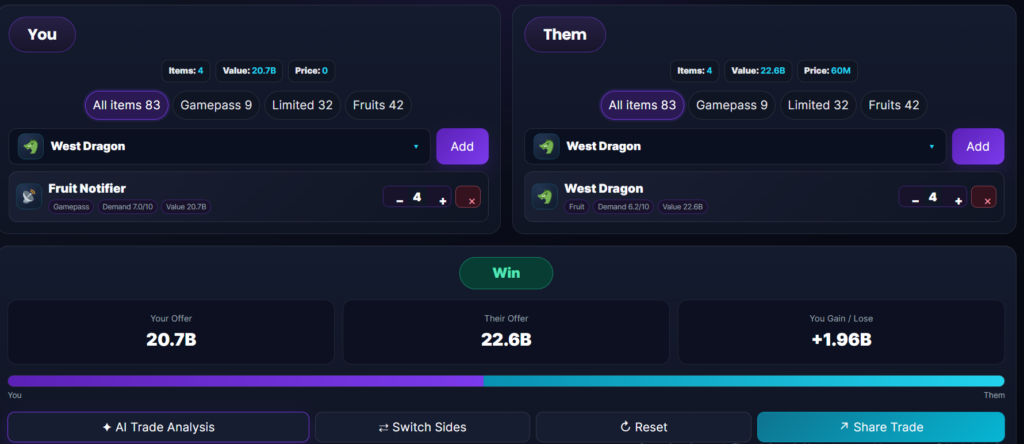
Make sure you select the correct item type. A physical fruit, permanent fruit, gamepass, mutation, and cosmetic item may have very different values.
The result compares:
- Your total estimated value
- The other player’s total value
- The value difference
- Demand on both sides
- How easy the items may be to trade again
- Whether the offer looks like a W, Fair, or L
Always check the final trade window before accepting. A calculator can help you compare an offer, but it cannot stop another player from changing an item at the last second.
Is My Blox Fruits Trade a W or L?
Your trade is a W when the items you receive have more useful trade value than the items you give.
It is Fair when both offers are close in value and neither side has a clear demand advantage.
It is an L when you give more estimated value or receive items that are much harder to trade again.
A numerically equal offer is not always Fair. One high-demand fruit may be easier to trade than several low-demand items with the same combined value.
How to Use the Blox Fruit Trade Checker
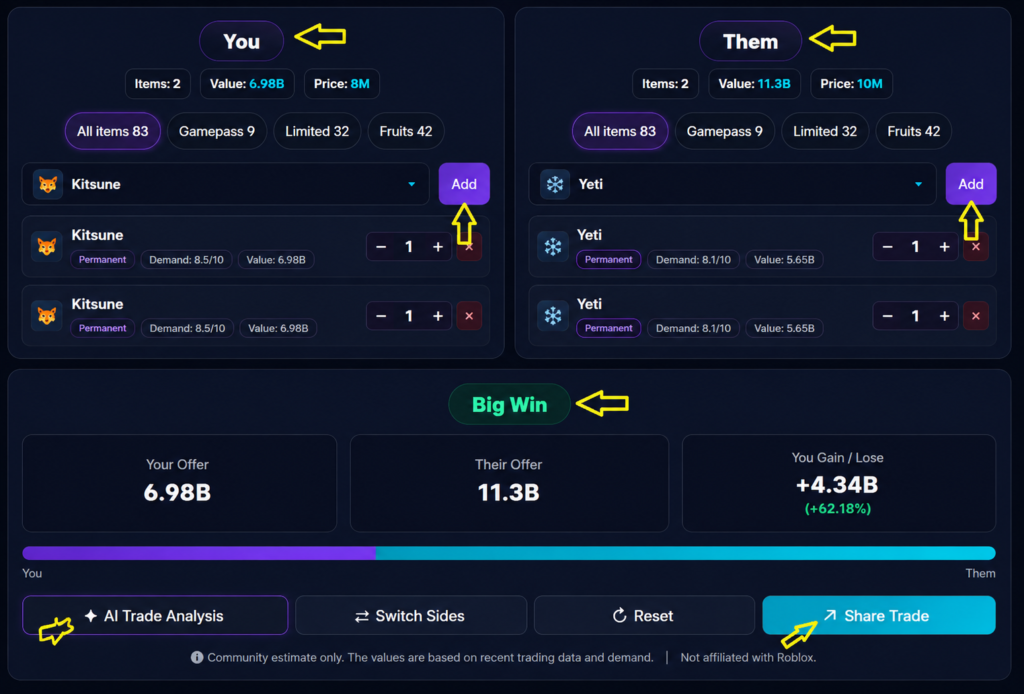
Add the items you are giving
Select all fruits and supported items included in your offer.
Do not leave out small adds. Even a lower-value fruit can change the final difference when the trade is already close.
Add the items you will receive
Enter the other player’s full offer.
Check the names carefully. Some fruits, mutations, and skins have similar names but are not the same item.
Choose physical or permanent
Select Physical when the player is offering a normal stored fruit.
Select Permanent only when the stored permanent product itself appears in the trade window.
Choosing the wrong version can produce a completely misleading result.
Compare the totals
The tool adds the estimated values on both sides and calculates the difference.
A higher received total may suggest a W, while a lower received total may suggest an L.
Check demand
Demand shows how strongly players currently want an item.
A high-demand fruit may be easier to trade again. A low-demand item may take longer to move even when its listed value is high.
Read the full result
Do not stop at the W or L label.
A useful result should explain why the trade received that verdict.
For example:
Small W. You receive slightly more estimated value, and the main fruit on their side has stronger demand.
Or:
L. You are giving more value and receiving lower-demand items. Ask for an add before accepting.
How the Calculator Determines W, Fair, or L
We keep raw trade value and demand separate so you can see what caused the result.
We total both sides
The calculator adds the estimated value of every selected item.
Your offer = Total value of everything you give
Their offer = Total value of everything you receive
We calculate the value difference
Value difference = Their offer − Your offer
A positive result means you receive more estimated value.
A negative result means you give more estimated value.
We compare the size of the difference
The raw number does not tell the full story.
A one-million value gap may be important in a small trade but minor in a much larger one. The percentage difference helps show how large the gap is compared with the full offer.
We check demand
Demand does not replace the raw totals.
Instead, it explains whether the items you receive may be easier or harder to trade again.
A result may say:
Fair by value, but the item you receive has weaker demand.
We show the verdict from your side
The verdict always describes your position in the trade.
Big W: You receive much more estimated value.
W: You receive the stronger offer.
Fair: Both sides are reasonably close.
L: You may be overpaying.
Big L: You give much more estimated value.
These labels are community trading terms. They are not official ratings created by Roblox or the Blox Fruits developers.
Blox Fruit Price, Trade Value, and Demand
Price, trade value, and demand measure different things.
What is the in-game price?
The in-game price is the official Beli or Robux amount connected to a fruit or premium product.
It affects purchasing and some trading restrictions, but it does not tell you exactly what another player will offer.
What is trade value?
Trade value is a community estimate used to compare items in player trades.
The community-maintained Blox Fruits Wiki trading guide states that fruits have developer-set money prices but do not have official player trading values.
This is why different value websites may show different numbers.
What is demand?
Demand shows how much interest an item currently receives from traders.
Demand can rise because of:
- A fruit rework
- A new mutation
- A game update
- Strong PvP use
- Grinding usefulness
- Limited supply
- Community hype
Demand may fall when more copies enter the market or players move toward other fruits.
What is tradeability?
Tradeability describes how easy it may be to exchange an item again.
A fruit can have a high estimated value but weak tradeability when few players are actively looking for it.
Can an Equal-Value Trade Still Be an L?
Yes.
Suppose one player offers a single high-demand fruit. The other side offers four low-demand fruits with the same combined value.
The totals may appear equal, but the single high-demand fruit may be easier to trade. The four-item offer also fills every available trade slot, leaving no space for another add.
The current community-maintained trading guide says players can place no more than four items in one trade.
Always compare value, demand, and the number of trade slots being used.
Physical Fruits vs Permanent Fruits
What is a physical fruit?
A physical fruit is a normal fruit stored in your inventory.
It can be selected in a trade when it meets the game’s trading requirements.
Eating, replacing, or losing access to the currently equipped fruit does not give the same permanent ownership as a purchased permanent fruit.
What is a permanent fruit?
A permanent fruit lets its owner equip that fruit again through the game’s shop system.
To trade a permanent fruit, it must be stored rather than activated immediately. The receiving player also cannot receive a permanent fruit they already own, according to the current trading documentation.
Why do permanent fruits have separate values?
Permanent fruit values should not be calculated with one fixed multiplier.
Their community values depend on:
- Robux cost
- Usefulness
- Player demand
- Popularity
- Current offers
- How often players seek that specific permanent fruit
Permanent Rocket, Permanent Portal, and Permanent Dragon do not automatically follow the same value multiplier.
We review permanent products as separate trade items rather than treating them as enlarged versions of physical fruits.
What Can You Add to the Calculator?
The calculator is designed for items that can appear in supported Blox Fruits trades.
Physical fruits
These are normal stored fruits.
Stored permanent fruits
These are permanent products stored for trading.
Stored gamepasses
Eligible stored gamepasses may be included when they can appear in the official trading interface.
Supported premium items
Certain stored Robux products and qualifying scrolls may be tradable.
The Blox Fruits Wiki trading guide currently lists stored fruits, gamepasses, permanent fruits, and qualifying stored premium products among supported trade items.
Mutations
Mutations must be listed separately from their base fruits.
For example, Empyrean is documented as a Mythical mutation of Kitsune and can exist as a separate special trade item. It should not be entered as normal Kitsune.
Items we do not value as normal trade items
The calculator does not assign normal fruit trade values to:
- Account levels
- Mastery
- Bounty
- Fighting styles
- Untradeable swords
- Titles
- Account-bound unlocks
- Unverified fan-made items
- Promises involving future trades
An item should appear in the database only when its identity and tradeability can be checked.
Blox Fruits Trading Limits
The calculator uses four slots on each side because that matches the documented trade window.
The current community-maintained trading guide states that:
- A player can add up to four items
- A player can complete five trades within eight hours
- Normal fruit offers cannot exceed the documented 40% official-price difference
- Stored gamepasses and permanent fruits cannot be given to someone who already owns them
- Gamepasses and permanent fruits must be stored before they can be traded
The 40% rule uses the game’s official item prices. It is not the same as community trade value.
A trade can pass the game’s official price restriction and still be considered an L by traders.
How We Review Blox Fruits Values
Our editorial team reviews repeated public offers, community demand signals, major game updates, reworks, and changes to item availability before adjusting a value.
We do not change a value because of one screenshot, one unusually high offer, or one player claiming that an item is rising.
We look for repeated evidence
A possible value change carries more weight when:
- Similar offers appear repeatedly
- The item names and versions are clear
- The evidence is recent
- The offers come from more than one community
- The same demand pattern continues over time
- A game update gives players a clear reason to want the item
We separate hype from stable demand
New fruits, mutations, and limited items often receive large overpays shortly after release.
We do not assume those first offers represent a stable market value. We look for repeated patterns before treating a short-term spike as a lasting change.
We review physical and permanent items separately
We do not use one multiplier for every permanent fruit.
We also keep base fruits, mutations, and tradable special items in separate categories.
We correct mistakes
When we find that an item was placed in the wrong category, given the wrong version, or valued using outdated information, we correct the entry during the next review.
The date shown on this page refers to the editorial review of the content. Individual calculator values may change at different times as market evidence changes.
Why Blox Fruits Values Change
Game updates
A buff, nerf, rework, or new ability can change how strongly players want a fruit.
New mutations and special variants
A new mutation may increase demand for its own trade item or affect interest in the original fruit.
Supply
An item may fall when more copies enter the trading market.
A limited item may rise when fewer copies remain available, although rarity does not guarantee strong demand.
PvP and grinding use
Fruits that perform well in PvP, travel, raids, or grinding may attract more offers.
Hype
New releases often receive temporary overpay.
The market may settle after more players obtain the item and real trade patterns become clearer.
How to Improve an L Trade
Ask for an add
Use the displayed value difference as a starting point.
Ask for an item that closes the gap without filling more than four trade slots.
Replace weak items
Several low-demand fruits may make an offer look large without making it easier to trade.
Ask whether one stronger item can replace the filler.
Remove an item from your offer
Sometimes the simplest fix is to give less.
Ask for better demand
A small numerical gap may be acceptable when the item you receive has much better demand.
Wait after an update
Values may be unstable immediately after a new fruit, mutation, rework, buff, or nerf.
Walk away
You do not have to accept an offer because another player is rushing you.
Pressure does not turn an L into a Fair trade.
Common Calculator Mistakes
Selecting permanent instead of physical
This can create a huge and inaccurate difference.
Forgetting an add
Enter every item from both sides.
Looking only at the total
Check demand and tradeability before accepting.
Using an old screenshot
A screenshot may show values from before a major update.
Confusing price with trade value
Beli and Robux prices are not the same as community trading estimates.
Treating rarity as demand
A rare item can still be difficult to trade when few players want it.
Assuming the verdict is guaranteed
No calculator can guarantee what another player will accept.
Use the result as a second opinion.
How to Avoid Blox Fruits Trade Scams
Use the official trade window
Do not trust promises to send an extra fruit, Robux, money, or another account item later.
Check the final offer
Review every item again before confirming.
Never share your Roblox login information
Roblox’s official account-safety guidance warns players not to share passwords, browser cookies, two-step verification codes, or backup codes.
This calculator does not need your Roblox password or cookie.
Avoid suspicious links
Do not open unknown links sent through Discord, Roblox chat, comments, or trading servers.
Do not install scripts
A value checker does not need an executor, browser script, modified Roblox client, or account-verification download.
Avoid cross-trading promises
Trades involving money, accounts, or items outside the official trade window carry much higher risk.
Why Do Different Calculators Show Different Results?
Different websites may use:
- Different value databases
- Different review dates
- Different Fair ranges
- Different permanent fruit values
- Different demand ratings
- Different methods for handling new items
One tool may look only at raw value. Another may include demand or tradeability in its verdict.
This tool keeps the raw totals visible and explains demand separately so you can see why an offer may be risky.
Is Dark Kitsune a Real Blox Fruits Item?
Dark and Kitsune are separate fruits.
The community-maintained Wiki has one page for the Dark fruit and another for the Kitsune fruit.
A player searching for “Dark Kitsune value” may mean:
- Dark
- Kitsune
- A Kitsune cosmetic
- The Empyrean mutation
- A fan-made or mistaken item name
Select the exact name shown in the inventory or trade window.
Can the Calculator Check Blox Fruit Skin Values?
Only a verified tradable item should receive a trade value.
The community-maintained Blox Fruits skins guide lists cosmetic skins connected to fruits such as Dragon, Empyrean, Pain, Lightning, Portal, Diamond, Eagle, and Bomb. It also distinguishes normal cosmetic skins from mutations that can change gameplay.
A cosmetic unlocked directly on an account should not automatically be treated as a stored trade item.
Before a skin or variant is added to the calculator, we check:
- Its exact name
- Whether it can be stored
- Whether it can appear in a trade
- Whether the trade transfers an item or only unlocks a cosmetic
- Whether it is a skin, mutation, fruit, or premium product
Blox Fruits Trading Terms
W
A Win. You receive the stronger offer.
Small W
A slight advantage in value or demand.
Big W
A large advantage based on the calculator’s current estimates.
Fair
Both offers are close enough that neither side has a clear advantage.
L
A Loss. You may be giving more useful value than you receive.
Big L
A large disadvantage.
Overpay
Giving more than an item’s common estimated value.
Lowball
An offer much lower than the other player is likely to expect.
Add
An extra item used to improve or balance an offer.
Upgrade
Trading several smaller items for one stronger or easier-to-trade item.
Downgrade
Trading one strong item for several smaller items.
Demand
How strongly players currently want an item.
Tradeability
How easily an item may be traded again.
Rising
Recent evidence suggests the item’s value or demand is increasing.
Falling
Recent evidence suggests the item’s value or demand is decreasing.
Stable
Recent trade evidence does not show a meaningful change.
About Our Value Data
The Blox Fruit Value Editorial Team reviews the calculator’s supporting content, item categories, trading explanations, and value methodology.
We use community market evidence as a guide, not as an official price list. We do not claim that every trader will accept the same offer.
Blox Fruit Value is an independent fan-made website. It is not operated, sponsored, or endorsed by Roblox Corporation, Gamer Robot Inc., or the Blox Fruits Wiki.
We do not sell Roblox accounts, arrange cross-trades, or request account login details.
Blox Fruits Values Tiers Explained
Every item in the calculator sits in one of five tiers. Knowing where an item lands helps you sanity check the Blox Fruits Value Calculator’s verdict at a glance:
| Tier | What It Means |
|---|---|
| Mythical | Highest-value fruits — Dragon, Kitsune, Yeti, Tiger |
| Legendary | Strong fruits, high demand — Phoenix, Portal, Buddha |
| Rare | Solid mid-tier trades — Magma, Ghost, Light |
| Uncommon | Entry-level trading fruits — Ice, Flame, Diamond |
| Common | Lowest value — Spin, Smoke, Blade |
FAQs
Is the Blox Fruits Value Calculator free?
Yes. You can compare supported trade items without paying or signing in with Roblox.
Is this an official Blox Fruits calculator?
No. It is an independent fan-made tool. The displayed values are community estimates, not official prices from Roblox or the Blox Fruits developers.
Is my trade a W, Fair, or L?
Enter every item from both offers.
A W means you receive the stronger offer, Fair means the sides are close, and an L means you may be giving more value.
How accurate is the calculator?
The result depends on the quality and freshness of the value database.
No independent tool can guarantee what another player will accept. Check demand, recent offers, and the item version before making a high-value trade.
Are these Blox Fruits values updated for 2026?
This page was reviewed on September 23, 2026.
Individual trade values are adjusted when repeated market evidence or a meaningful game change supports an update. We do not use the year alone as proof that every number is current.
Does demand affect the result?
Demand helps explain how easy an item may be to trade again.
Raw value and demand are shown separately so you can see whether a numerically Fair offer still carries a tradeability risk.
Can I calculate permanent fruit trades?
Yes, when the permanent item is supported by the database.
Select Permanent only when the stored permanent product appears in the trade.
Can I add gamepasses?
Eligible stored gamepasses can be added when they are supported by the calculator and can appear in the official trading interface.
Can I check Blox Fruit skin values?
Only verified tradable skin, mutation, or special items should appear.
An account-bound cosmetic should not be given a normal trade value.
Is Dark Kitsune a real trade item?
Dark and Kitsune are separate fruits.
The phrase may also refer to a cosmetic, the Empyrean mutation, or an incorrect community name.
Why is the Wiki price different from the calculator value?
The Wiki may show the official Beli or Robux price.
The calculator shows an estimated community trade value. These numbers measure different things.
Why do other calculators show a different result?
Other tools may use different databases, review dates, Fair ranges, permanent fruit values, and demand ratings.
Can this tool calculate my account value?
No. This tool compares supported tradable items.
It does not assign a cash value to Roblox accounts or support account buying and selling.
Do I need to log in with Roblox?
No.
Never enter your Roblox password, browser cookie, verification code, or backup code into a value calculator.
Can I share my trade result?
You can share the selected items and result when the calculator’s sharing option is available.
A shared result should never contain private Roblox account information.